ROB_expressions — Player Features
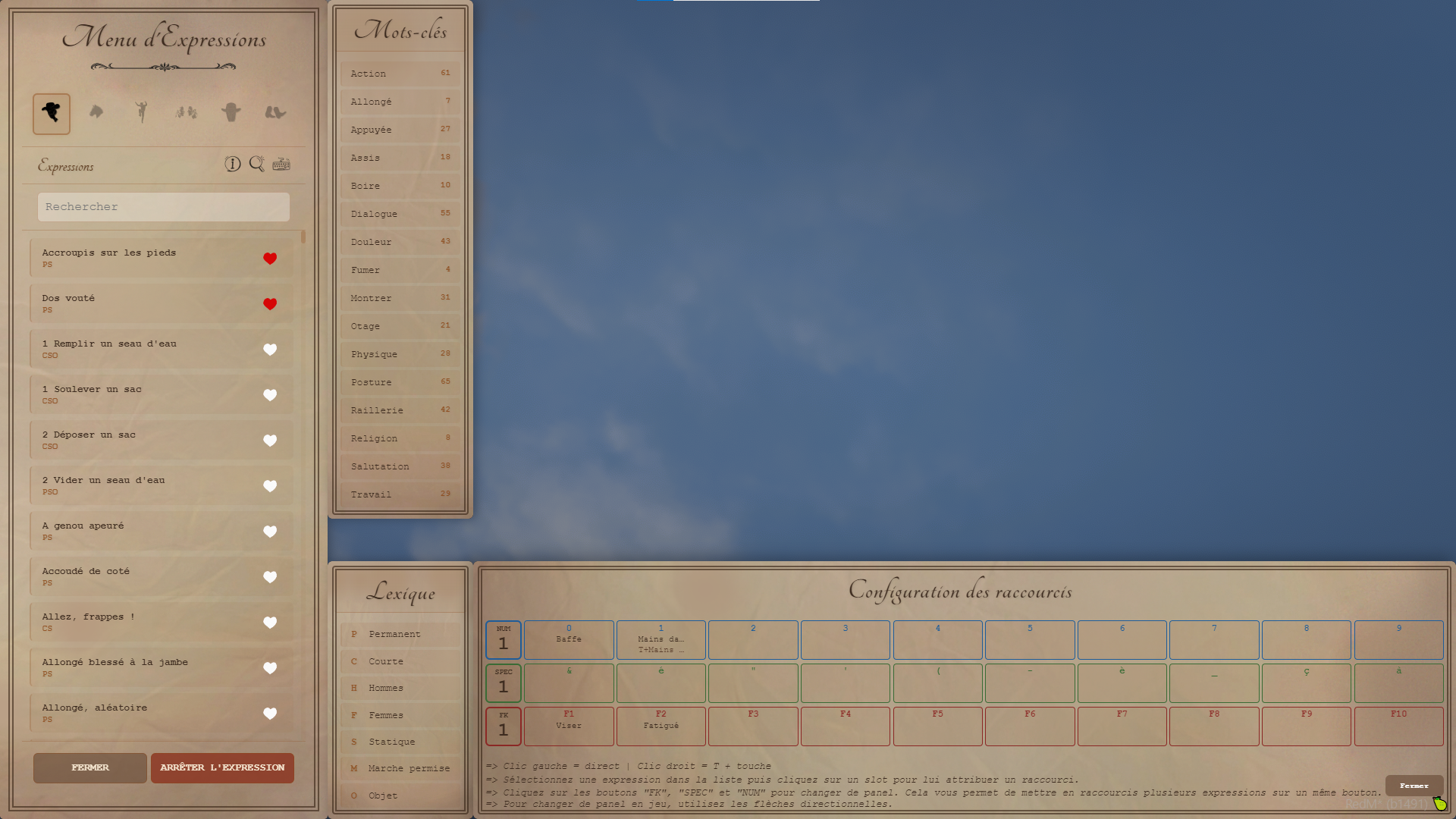
This menu was created to allow players to express themselves with consistency, fluidity, and speed in roleplay, while eliminating the bugs and limitations we have experienced until now. Character movements are now smooth and natural most of the time, without teleportation or visual inconsistencies.
Over 800 ways to express ( without environmentals scenarios ) yourself are currently available, and the content will continue to expand with future updates.
The current price is not representative, the resource is still under development and will be officially available very soon with the final (lower) price.
Animations
-
Play static or walking animations on your character
-
Two-player animations: approach another player and select a shared animation (initiator + target)
-
Native game emotes and scenarios (smoking, leaning, etc.)
-
Persistent facial expressions (moods) for your character
-
All animations, emotes, and scenarios have been individually tested and carefully adjusted to ensure visual quality and consistency
-
Props used by scenarios are now properly removed and no longer remain attached to characters
-
Preview system for all expressions and facial expressions
Walkstyles & Movement Speed
-
Change your character's walkstyle
-
Adjust your walking speed using an 11-step slider (from very slow to fast)
-
Use shortcut config + mouse wheel to change speed without opening the menu
-
Enable auto-walk (move forward without holding the key)
Keyboard Shortcuts
-
Assign up to 300 shortcuts to trigger your expressions directly in-game
-
Direct mode (single key) or combined mode (shortcut config + key)
-
Display a memo of your shortcut grid without opening the menu (Down Arrow)
Sitting & Lying Down
-
No more teleportation: characters naturally perform their actions just like in Story Mode
-
Automatic distinction between male and female scenario variants when applicable
-
Appropriate sitting scenarios are automatically selected depending on the environment (for example, when facing a table)
-
Approach a chair, bench, or bed and an interface will automatically appear
-
Browse through multiple sitting animations using the directional arrows
-
Press Down Arrow to confirm and Up Arrow to stand up
-
On benches, the system automatically detects whether the left or right side should be used
Context Menu
-
Press the Expression shortcut near a scenario point to view available interactions
-
Preview a scenario on a clone before confirming it
Interface
-
Filter animations using keywords or browse the built-in glossary
-
Add your favorite expressions (pinned at the top of the list)
-
Access the integrated tutorial through the dedicated icon
-
Available in both French and English
Persistence
-
Your shortcuts, walkstyle, mood, and favorites are automatically saved when closing the menu
-
Everything is restored when reconnecting or respawning
/\ To be available soon: a showcase video of the features. More content, more than 100+ new expressions for sitting and sleeping /\
ROB_expressions — Technical & Administration
A README file is available in the resource for more details and explanations about the front-end and back-end features.
Architecture
-
RedM resource (FiveM) written in Lua 5.4 with NUI (HTML/CSS/JS)
-
Available for REDM, VORP, RSG
-
Client-side scripts separated by responsibility (variables, animations, sit & sleep system, shortcuts, security, NUI callbacks, contextual scenarios, shared expressions)
-
Fully configurable via
config_shared/— no code modification required to customize content
Language System
-
Config.language = "french"or"english"ininputs_and_translation.lua -
Single if/else block, no code file modification required to change language
-
All UI texts, buttons, context menus, and console messages are centralized
External Integrations
- Compatible with
ROB_musiquescript to avoid menu conflicts
Walkstyle Network Synchronization
-
On menu close:
TriggerServerEvent("ROB_expressions:setwalk")if walkstyle has been modified -
Redistributed to other players via
ROB_expressions:getwalk -
Built-in self re-application prevention system
Optimization
- Code is optimized to ensure no loops impact gameplay performance or server stability
Sit & Sleep Exceptions (Polyzone System)
-
Exceptions are applied for sitting in certain mapped areas or rare locations where chairs are too close to tables
-
Safety system teleports the character as in a standard script when necessary
-
Defined in
Config.polyzoneExceptioninsidesit_and_sleep_props.lua -
Structure: zone name → PolyZone (2D coordinate array) +
exceptionPropsPolyzone(list of model types) -
Checks prop model first, then polyzone (optimization: avoids unnecessary raycasting)
-
Allows direct teleport onto props without UI entry for specific mapped areas (e.g. saloon tables)
Safety Systems
-
No more props remaining attached to characters (configurable)
-
State protection preventing expression usage or menu opening when not allowed
-
Optional cancel button for expressions only (configurable), preventing gameplay or design exploits
Content Creation
- You can create and add your own content and calibrate it using the provided templates within the resource